So I have been developing a Dropbox Client for Windows Mobile called DroppedBoxx and I thought I’d take some time to talk about how it works, my plans for its future and talk about some of the new features of the latest version v1.1 which has now been released to the Windows Phone Marketplace and Handango.
Firstly, the new features in v1.1 include: (Full Changelog)
- Two-way Syncing of selected folders
- Updated UI (Labeled buttons, Background Uploading, Sync Folders screen is updated so you know when its syncing)
- Bug fixes for the Attach to Email and errors caused by loss of connection
- Added settings for camera resolution
This screen is where the User Logs in user their dropbox account. Login button trys to login, keyboard button shows the Windows Mobile SIP keyboard. Exit button exits the app. Remember me saves your login details so next time you run the app your automatically logged in.
Sync Folders/Home Screen:
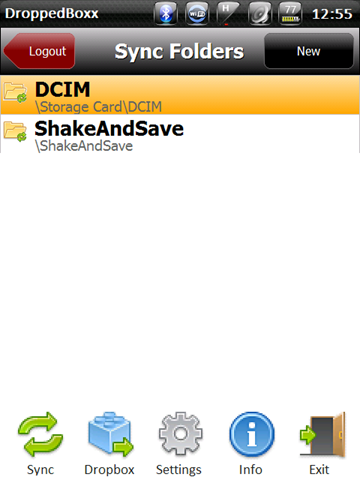
This is pretty much the Home screen for the application. From here you can add folders for Syncing by clicking New and browsing the phones file system and selecting a Folder to add. The Logout button on the top right obviously logs you out returning to the login screen.
The 5 Buttons down the bottom:
- The Sync button starts the “Sync” process syncing the folders in the list to your dropbox account into a folder called “Droppedboxx” (Note: this feature is unavailable in the Beta versions, more on that later)
- The Dropbox Button opens up the root folder of dropbox for you to browse.
- The settings button opens the settings screen where you can change app settings (such as Clearing saved login, max file sizes and camera resolution.
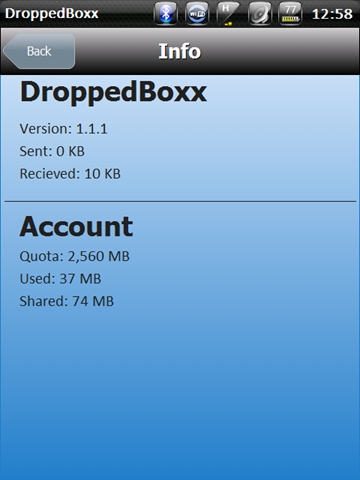
- The Info button is to show the dropbox User info, including quota and usage but also DroppedBoxx version information and data used by this DroppedBoxx session.
- The Exit button closes the app.
Browse Dropbox:
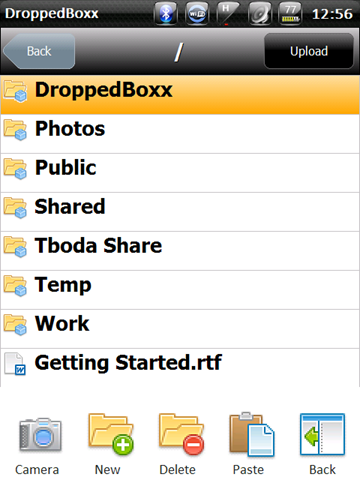
This is where most of the functionality is, from this screen we can upload, download, delete, etc. files from Dropbox. Starting at the top, the Back Button takes you “up” a directory in the Dropbox file system or, if your in the dropbox root, takes you back to the Home Screen. The Upload button lets you browse the phones file system and select a file to upload.
Here you have a list of Files and folders that are in the current folder on Dropbox selecting a folder opens up that folder.
The bottom button panel:
- The Camera button opens up the Windows Mobile camera application and when you take a photo it uploads it to the folder you are currently in in the Dropbox browser.
- The new folder button simply creates a new folder in the current folder, opening up a dialog to enter the Name.
- The Delete folder button Deletes the current folder your in (asking for confirmation first)
- The Paste button is for moving/copying files, if you have a file in the “clipboard” pressing this button will ask if you want to copy or move the file to this folder. (More info in file menu)
- The Back Button goes back to the sync folders screen (The Back button on the top left goes up a directory or back to sync folders if your in the dropbox root)
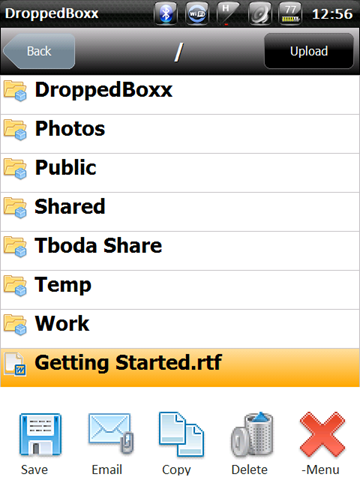
This is the menu that comes up after selecting a dropbox file.
- Save Button Downloads the selected file (opening a file system browser to set the download folder)
- Email button, downloads the file to a temp folder and attaches it to a New email message in Pocket Outlook (assuming this is set up it firsts asks you to select the account)
- The Copy button puts the selected file in the “clipboard” so you can paste it somewhere else in the dropbox file system (giving you options to Copy or Move the file)
- The bin button deletes the selected file (asking for confirmation first)
- The –Menu button simply closes the file menu (to allow access to the Folder menu again)
Here you can change the Settings of the application such as clearing saved login details, setting a max filesize for sycning and setting the camera resolution for camera uploads.
Information:
This screen displays application and user info. It shows the DroppedBoxx version number and data sent and received by the application for this session. As well as the users dropbox quota information.
DroppedBoxx can be downloaded from the Windows Phone Marketplace or Handango.
Also you can follow the discussion about this app by going to the thread on XDA.
Hi Damian.
Just installed DroppedBoxx v1.4 on a Touch Diamond. It allowed me to set it up, connect to Dropbox, etc. but it crashes during the synchronisation activity with an “out of memory” error. I would’ve expected the memory footprint to be pretty small on this kind of application.
Also (and this is being picky) “receive” is spelt with “i” after “e” except after “c”.
Great to see some Australia software out there. Keep up the good work.
Phil.
@Phil, I think the “out of memory” error is due to not having .NET 3.5 CF installed (theres a link further up in the comments for it)
Let Me know if its not the problem.
Thanks Damian. It (Settings/System/Remove Programs) reckons “Microsoft .NET CF 3.5″ is installed. I think marketplace actually installed it for me when I bought the application.
Phil.
hi-love dropbox & thought this was going to be the best app ever.i expected to be able to sync all of my dropbox but it seems only to be able to add a folder between my mobile & dropbox! I must be a muppet! Please help me sync my whole dropbox with my phone or even an existing folder on dropbox. Sorry if I am too stupid to understand setup. Thank you for cool app
@Lindsay, Sorry but syncing wasnt designed to work that way. Instead of bringing down the entire Dropbox folder DroppedBoxx simply lets you select certain folders on the phone to be synced to the /DroppedBoxx/[foldername] folders in your dropbox account.
@Phil, could you get me a screenshot of the error message and email it to me?
dkarzon[at]tboda[dot]com
I recently had a video file I wanted uploaded with your app so I set the file to sync. After the sync, the video didn’t seem to move. I looked with File Explorer to make sure the video was still there. I ran the sync again. Still no video. All other pics seemed to sync, but not this video. I added the folder again, thinking maybe I had the wrong folder syncing. All the photos in the folder changed their modify date to today and now my video is gone. Took another quick video and it synced fine. Very frustrating, and my video seems to have been deleted. What did I do wrong here?
Your reviews look great. Any plans for a Windows Phone 7 app?
Can you say, when there will be the droppedbox app for Windows Mobile 7?
@Erin, @Oliver I dont think I will be doing a Windows Phone 7 app as the platform isnt as open as Windows Mobile 6 so the app wont be able to offer functionality such as syncing.
Great app, I just downloaded it from Handango, but it is only syncing 3 files in each folder and deleting the rest. I’m trying to sync files on the SD Card in my HTC Touch Pro2 on Sprint with dropbox.
Adding a file from my PC to a DroppedBoxx synced folder wiped the contents of the folder on my WinMo device. This seems like a MAJOR bug to me! Thankfully I had a backup to restore the device from, but it seems like I can’t rely on the sync function. Will you address this with a new release?
Hi! Used DroppedBoxx for several months w/o any problem. Recently, when trying to start it on my Omnia II (Win 6.5), it crashes and returns the error: An unexpected error has occurred in DroppedBoxx.exe. MissingMethodException
File or assembly name ‘System.Core, Version=3.5.0.0, Culture=neutral,PublicKeyToken=969DB8053D3322AC’, or one of its dependencies, was not found.
Uninstall /Reinstall has not helped. All other apps running fine.
Please assist.
P.S. Looks like XDA thread is dead.
Application looks good, but like @Joshua I have several files deleted on my HD2.
Hi, I purchased the program in Handango, but I am having dificult to use it. I do not receive any errors, but every time I try to login with my dropbox email anda password, after a while waiting, I receive a message “Login Failed. Please try again.” I tried several times and the result is the same. Do you have any idea what may be happening ? I am using an XPeria X1 with windows mobile 6.5. Thanks.
Fantastic app. I am a Mac user with a HTC Touch Pro2 Windows phone – who needs cables!!!!! I am able to sync my phone files and Mac files. It is amazingly good. Well done.
Hi,
it’s amazing soft. But I miss one function – autosync(at start, respectively after periodic time).
It’s possible create/add it ?
Thx.
DroppedBoxx is quite amazing. I’ve noticed a couple of minor things that I thought I’d mention, in case there is ever another release:
1. Login screen: The input fields don’t allow pasting; they should. I want to copy my complex password from a file and paste it here.
2. Login screen: The input fields don’t support Fn+Sym for entering symbols and uncommon characters; they should. (Press blue “Fn” key on keyboard then “OK/Sym” button.)
3. After a download from DropBox, DroppedBoxx gives a message like “Upload successful; open with default app?”. Change “Upload” to “Download”.
Have bought this… Why photos taken from DroppedBoxx are saved on Root directory?! Should be saved to Photos folder!
Hi, I purchased it. But when I sync my HD2 photo folder it deletes my newest photos from phone. What’s wrong? I just want to copy new photos from HD2 to my pc droppedboxx folder Why does it delete them instead???. Help please.
I purchased from Windows Marketplace. It works great as long as the file I’m downloading or syncing is less than 1MB. If it’s more than 1MB I get ‘download failed’. HTC HD2 (T-Mobile/WiFi).
Unfortunately there seems to be a few major flaws in the DroppedBoxx sync logic.
Based on my testing and observations, DroppedBoxxed bases sync simply on date/time of last sync. The logic goes something like this:
1) If the version of the file on the device is newer than the last time of sync and newer than the version in the cloud, (or the cloud doesn’t have that file) upload it.
2) If the version of file in the cloud is newer than the one on the device, download it.
So far so good. Here’s the problematic logic:
3) If the cloud has a file older than the last sync that doesn’t exist on the device, assume the file has been deleted from the device and delete it from the cloud.
4) If the file on the device is older than the last sync and doesn’t exist in the cloud, delete it from the device, assuming it has already been deleted from the cloud..
Those seem like reasonable assumptions, but they can get you in trouble. If, for example, you _move_ a file from one Dropbox folder into another using the web interface, that file may well be older than the last sync date and gets deleted on the next sync, since it fails Logic test #3. Or, if you copy files from your PC to the device’s SD card using a card reader, those files will have the PC’s file date, which again might be older than last sync, and get deleted by DroppedBoxx at next sync by logic #4.
Also, files moved from one folder on the device to another synced folder using the device’s File Manager also get deleted if the file date is older than last sync by logic #4. For example, I sync my \My Documents folder and my \Storage Card\My Docs folder with DroppedBoxx. If I move a file from main memory to Storage to clear up room in main memory, it gets deleted next sync, because the original is gone, which then deletes _it_ from the cloud, and the moved file is now older than last sync, and doesn’t exist in the cloud _at that folder_, so DroppedBoxx deletes it from the device and doesn’t sync it to the Cloud folder. The only way to prevent this is to open it after moving it and make some small edit (add a space, whatever) to reset the file date before the next sync.
Understand I’m not writing this to crap all over DroppedBoxx. It’s a good app and a great value for the money, and I use it to backup my WinMo devices as well as keep them in sync with each other. I’m only pointing out that true file sync is a delicate and difficult procedure, and DroppedBoxx uses a very simplistic approach that makes some dangerous assumptions for expediency.
A “permanent” solution would require DroppedBoxx to keep some kind of log file of all files synced with times and dates of last sync and/or deletion on the device and use that to determine whether to sync or delete, like Activesync/WMDC does and Live Mesh for Windows Mobile did. Any file not in the log file would be presumed “new” regardless of the actual file date and sync. This would prevent all of the accidental deletions. Keeping a log would also prevent the needless “ghost” resyncing of already synced files. (For example, DroppedBoxx uploads a new file created on the device at 8:00AM to the cloud at your next sync, say at 10AM. Now the file in the cloud is “newer” than the one on the device, since it has the 10AM current date/time. At the next sync, the “10AM” file is downloaded to the device replacing the 8AM version, even though they are identical, because the cloud copy is two hours “newer.”) This consumes a lot of unnecessary data, particulalry for larger files like photos. If the device had a log file that “told” DroppedBox “photo007.jpg last sync 10:00AM” DroppedBoxx would compare that sync time to the date of the cloud version and realize the file is in sync. More importantly, if a file on the device with an old file date (like a file you transferred from your PC) hadn’t synced yet, it would NOT have a log entry, and therefore would be synced, rather than deleted. (If a previously synced file was deleted from the DropBox cloud, DroppedBoxx would notice that file had a log entry, and therefore delete it and the log entry, since it was a file previously synced.)
This would require a major rewrite and is probably beyond what we can expect from the developer of a $2 app!
I’d like to suggest a few much simpler fixes that would take comparitively little effort : any file deleted from the device by DroppedBoxx should get a “Delete File So-and-so?” Yes/No/Yes to All/No to All dialog box. Any file _not_ deleted would then get the file date _changed to the current sync time_ to prevent deletion next sync. This would require no change to the sync logic, just the kludgey insertion of the dialog box at any point in the code where a file would be deleted from the device, and a forced file date/time change to futureproof it in subsequent syncs.
The second idea would require less user interaction at sync, but be more work for the developer: create a DroppedBoxx Trash Bin on the device. All deleted files would be moved to it for user review later. Files “restored” from the bin would be reset to the _restored time/date_ to ensure syncing without deletion at next sync. DroppedBoxx’s setup could define a automatic deletion of binned files older than x days to prevent unrestored files from clogging up the device. If you don’t manually restore them in that time, they’re flushed.
As an alternative to idea #2, I offer #3: instead of a trash bin, _upload_ any file on the device about to be deleted by the app to DropBox and immediately delete it there. That way, it can be recovered using DropBox’s existing restore feature using the web interface, and should download and be restored at next sync.
The existing logic just has too many situations where a file can be deleted from the device BEFORE ever being uploaded to Dropbox, preventing any type of recovery, which makes DroppedBoxx far too dangerous to sync important files. Any of my suggestions would mitigate that, so users, with a little effort, could recover any files unintentionally deleted by the simple sync logic.
Again, thanks to DK for a good program. As is, it provides a decent method of backup/sync if one is careful to “outwit” the flaws in the sync logic. With some slight changes and a clear explanation to users of why files might “mysteriously” disappear, it could be a much better program with minimal effort on the developer’s part.
Hi, I have paid for the ‘DroppedBoxx’ app on WindowsMobile Marketplace but am unable to download it for some reason (I am able to download other apps fine but get an error message saying can’t connect to server to download only when I try to download DroppedBoxx.) On asking Microsoft Mobile Support, after trying some simple things like rebooting and logging off and back in Marketplace (it still didn’t work), they have said it’s probably a compatibility issue and to contact the developer and ask for a .cab file (and they sent me a link to your website/blog). They have said they’ll reimburse me if the issue remains unresolved. I am writing from Sydney and I use HTC HD2 (T8585 from UK) connected to internet by WiFi and 3G.
Kindly send me a link to the .cab file for your application. Thanks.
-Tejas
Hey there! Thanks for the info.
Tried to update to 1.5 on the Windows Marketplace site (T-Mobile HTC HD2) and it fails with some kind of server error. Microsoft Windows Marketplace support has given me two options. 1) Refund or 2) Get a .cab file direct from the developer. This is just stupid.
Looks like the Windows Market place fails to install the program. Server error of some time. Is there a way to fix this or get the .cab?
Just got the 1.6 update from Handango, and I have to say kudos! The sync/file deletion problems are history.
Thanks again for an awesome app.
Just purchased from Fandango. Overall nice app, thanks.
One issue – after adding a folder to be synced – I can find no way to remove it from being synced. The main page only has a “new” button to add additional sync’d folders but no way to remove folders inadvertantly added.
Need a solution to this. Perhaps it is possible with the folder highlighted if the keyboard could be accessed to hit ‘delete’ key, but on my HD2 no way to bring up the keyboard while on that screen.
@Nbehm, This issue has been brought up and a fix will be available in the next version.
Is there a config file I might be able to edit manually? Once already I’ve had to uninstall, delete \Application Data\DropppedBoxx\ directory, reinstall to remove a folder.
Was just putting finishing touches on after 2nd install, but now I think the last folder I’ve added is causing DroppedBoxx to crash invariably on sync.
Would like to be able to just remove that last added folder, at least for troubleshooting purposes.
One other thing (you may already be aware). DroppedBoxx does not seem to like to download files containing certain characters including parentheses, exclamation points, and quote marks. Haven’t confirmed, but I think it will upload them, just not download.
Anyway, don’t want to obscure issue, the request in first line of post is my priority.
Thanks for the quick reply btw
Date: July 16, 2011 (should always be required, for tracking)
I purchased DroppedBoxx through Windows Marketplace on 1-22-2011. I believe it was Version 1.1 but I’m not absolutley sure. I installed it on my Verizon HTC Touch Pro 2 Windows Mobile 6.1 smartphone and synced it with my DropBox account.
I had some sort of difficulty, but then I got busy with work, and I didn’t use it again until now.
I can’t find a web site with Instructions on how it works, FAQ or Support for DroppedBoxx?
My problem is:
Problem #1.
I can’t remember which email address I used as a LogIn nor can I remember the password I used.
I can try all my email addresses, there are only five but how do I reset the password? It keeps telling me “Incorrect Username/Password”.
Problem #2:
I see that MarketPlace has an upgrade to version 1.5. How exacly do I install the upgrade to version #1.5? Should I uninstall the version #1.1 first (how?) or will verson #1.5 write over it? Will 1.5 ask for the email and password that I origionally input and can’t remember? Should I purchase version 1.6 from Handango instead? Then, again, do I uninstall (how?) or does 1.6 overwrite? Then for 1.6, what about the login and PW?
What do you advise?
I know that you must not have time to answer many questions, so maybe answering these will keep them from needing to be asked again. Thank you,
@Kevin,
There currently is no real FAQ/Support site for the app. Its pretty much a combination of this blog post, email and the thread in XDA.
As for your issues:
#1 – This is probably somethign I am unable to help you with as the account is actually with http://www.dropbox.com but they have a reset password feature that should be able to help find your lost account.
#2 – Upgrades are easy, if you purchased through Marketplace just go into the Marketplace app and hit upgrade (I would do this before retrieving your password as 1 of the updates 1.2 or 1.3 changed the way tokens are stored so it required a re-login)
Let me know if you have any further issues.
Is the syncing only done manually? Is there no automatic sync like the desktop version where the cloud files are updated if the device files change?
Yes, at the moment Syncing is a manual thing that happens when you press the sync button. I have had a lot of feedback about adding an auto sync feature and it might happen in the future.
Hmmm. Would it be a biggie to implement it sooner rather than later? We (Uni of QLD) really need a way to update a base station from mobile clients collecting GPS and behaviour data for a big humpback whale project on the Sunshine coast next month. A command line or API access could work if possible at all from my C# data logging app…
Great app! Another vote for autosync. Now that Microsoft MyPhone is shutting down ( bah, Microsoft) you will have many people like me who are looking for a replacement to MyPhone. I think the AutoSync is the only thing that’s missing.
Great Tool … works fine on my HTC HD2 with Win Mobile 6.5.
Hi. I just purchased DroppedBoxx from Handango. But it’s V1.6 only. Where can I find the latest version V1.7 with the fixed bugs (like syncing is failed) and the possibility to delete (i.e. o remove from syncing) a folder ?
December 18, 2011
I have a Verizon HTC TouchPro2 Windows Mobile 6.5 phone.
Where can we find the current version of DroppedBoxx software? The version on Microsoft Marketplace for Windows Mobile is version 1.5. Handango doesn’t have it. .