I’ve had some version of the same conversation a few times now. Someone shows me an app they built in Lovable, it has actual users and maybe some revenue, and they want to know how to get it off Lovable. When I ask what they plan to use to make changes after that, there’s usually a pause.
It turns out they don’t want to stop prompting. That’s how they built the app, and for a lot of them it’s the only way they know how to change it. What bothers them is that the thing paying the bills is running on a lovable.app subdomain, in an account they don’t control, with a publish button that anyone on the project can hit.
Most of the advice out there treats this as an either/or. You stay in the builder, or you export the code and move to a “proper” setup with a developer. I don’t think it has to be that way. My take is that you keep the builder as your staging environment and run production in your own cloud account.
Why people want out
The reasons I hear are pretty reasonable. A client wants the app hosted in their own AWS account. Someone asks where the customer data lives and nobody has a clear answer. The monthly cost is hard to predict. Or the app needs something the builder isn’t great at, like background jobs, other AWS services, or monitoring that tells you when something breaks.
The problem is what you give up by leaving completely. You lose the quick loop of prompting a change and seeing it in a preview a minute later. You lose the visual editor. And whoever on the team was fixing copy and tweaking layouts in their lunch break can’t do that anymore.
For some apps, moving off the builder and handing it to a dev team is the right move, and I’ll come back to when. But for a founder or a small team, it often means going from I can change my app to I have to ask someone to change my app, and I think that’s a big step backwards just to sort out hosting.
Lovable is already a staging environment
If you look at what Lovable gives you, it’s a dev and staging environment with a good editor on top. Every change shows up in a preview you can click through and test. That’s most of what staging is.
What it doesn’t give you is the production side. There’s no point where someone decides a change is ready to go live, nothing stopping a prompt from changing the live app directly, and no infrastructure that belongs to you.
GitHub sync is what makes it possible to split the two. Lovable syncs both ways with a GitHub repo: changes made in Lovable are committed to the repo, and commits pushed to the synced branch are pulled back into Lovable. The detail that matters here is that Lovable only edits and syncs one branch at a time, which is the default branch unless you switch it. Anything on other branches, Lovable doesn’t see.
You’d normally think of that as a limitation, but for this setup it’s exactly what you want. The code lives in a repo you own, and Lovable can only ever write to one branch of it.
Bolt works much the same way, with two-way GitHub sync and branch support (merging happens over in GitHub). I’m going to stick with Lovable for the examples, but the same idea applies.
How I’d set it up
- Keep building in Lovable as you do now. Changes sync to
main. - Use Lovable’s preview and published site as staging, and test there.
- When you’re happy with what’s on
main, open a pull request into aproductionbranch and merge it. - A GitHub Actions workflow on the
productionbranch builds the app and deploys it to your AWS account. - Production runs on your domain, in your account, and Lovable has no way to touch it.
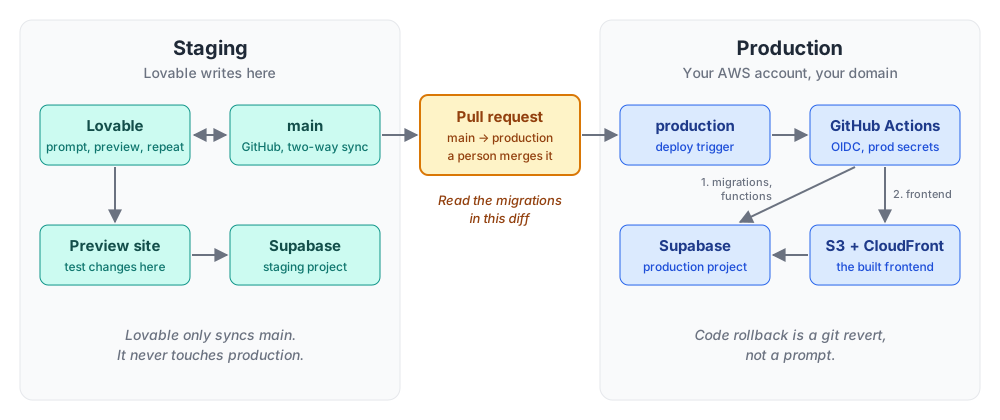
The AWS side is simpler than people expect. A Lovable app is a Vite single-page app that talks to Supabase, so production hosting is mostly an S3 bucket with CloudFront in front of it.
The pull request is the bit I care about most. When the builder’s publish button is production, nobody ever has to decide that a change is ready. Putting a pull request in the way means a person makes that call every time. It also gives you one diff of everything that’s changed since the last release, which is handy when the changes came from twenty different prompts and you can’t remember half of them.
Rolling back gets easier too. If a release goes bad, you revert the merge on production and the pipeline redeploys the previous build. That’s a lot more predictable than asking the AI to undo what it just did and hoping it undoes the right thing.
One rule I’d stick to: fixes always go through main. If you patch production directly, Lovable never sees the change, and the next promotion will either conflict or quietly undo your fix.
The hard part is the data
Splitting the code between staging and production is easy. The backend is where it gets fiddly.
A Lovable project connects to one backend, either Lovable Cloud or your own Supabase project, not both. So you need two Supabase projects. Lovable points at the staging one and the production build points at the production one.
If you’ve already been using your own Supabase project and it has real users in it, that project is your production database. Create a new one for staging and point Lovable at that instead. Supabase recommends staging be a fresh project rather than one that’s been changed to match production, because the CLI will try to reapply migrations to it. If you’re on Lovable Cloud, you have a migration to do first. Carol Monroe has good write-ups on exporting off Lovable Cloud and the full migration, so I won’t repeat them here.
After that there are a few things to sort out.
The Supabase URL and anon key are VITE_ variables, which means they get baked into the frontend when it’s built. The .env in the repo keeps the staging values for Lovable, and the production pipeline injects the production values from GitHub secrets at build time. Don’t ever let production read from the committed .env. Lovable has been known to rewrite it back to its own settings, and you don’t want a prompt about button colours pointing your live app at the staging database.
Lovable writes schema changes as timestamped SQL files in supabase/migrations. On promotion, the pipeline links to the production project and applies them:
supabase link --project-ref $SUPABASE_PROJECT_ID
supabase db push
That needs a Supabase access token, the database password and the project ID stored as GitHub secrets. Run it before the frontend deploys so the new code never hits the old schema. There’s no built-in down migration, so if one fails partway or does something you didn’t want, the fix is another migration that corrects it. This is why I’d read the migrations folder in every promotion pull request, line by line. It’s the one part of the diff that can’t be undone with a revert.
Edge functions live in supabase/functions, and the same pipeline can deploy them to the production project with supabase functions deploy, so functions and schema go out together. Secrets are set separately in each Supabase project with supabase secrets set or through the dashboard, and they never go in the repo.
I’ll be honest about the downside. Two environments means two of everything to keep in step, and that’s more work than one. Prompting will also happily write a migration that’s fine against the fifty rows in your staging database and painful against the fifty thousand in production. Renaming a column, adding a NOT NULL without a default, dropping a table the AI decided you didn’t need anymore. Staging won’t catch all of those. Someone reading the migration before it ships will catch most of them.
Where ScaleBop fits
This setup is a big part of why I built ScaleBop.
You sign in to ScaleBop and connect the GitHub repo that Lovable syncs to. It checks that the app is ready to deploy, generates the AWS infrastructure in CDK along with a GitHub Actions pipeline that uses OIDC, commits all of it to your repo, and deploys into your AWS account. The pipeline runs off the production branch rather than main, and it injects the production Supabase values at build time, so the promotion step and the environment split are set up for you.
It doesn’t handle migrations or edge functions yet. For now you add the supabase db push and functions deploy steps to the workflow yourself, as above.
Because the infrastructure and pipeline sit in the repo, you keep prompting in Lovable the same as before. Lovable just sees some CDK files and a workflow it doesn’t need to care about. And if you stop using ScaleBop, the app keeps running, since everything it set up is in your repo and your account.
When this isn’t the right setup
It won’t suit everyone. If the app has outgrown prompting, with a dev team writing a lot of code by hand and the builder fighting them on it, it’s time to leave properly. One shared staging environment also gets painful once several people are making changes at the same time and what you need is a preview environment per feature. And if compliance means even your test data has to live in your own account, staging inside the builder isn’t going to fly.
AI builders are the best prototyping tools I’ve used, and it seems a waste to throw that away as soon as an app gets real users. For most of the people I’ve talked to, adding a pull request and a second Supabase project gets them most of what they were after when they asked how to leave.